Create your own ecommerce website and start selling successfully with ShopWired today


EU Accessibility Regulations Are Coming – Here’s What ShopWired Merchants Need to Know
From 28 June 2025, new EU regulations will require all consumer-facing webshops to meet certain accessibility standards. Known as the European Accessibility Act (EAA), the goal is to make online stores easier to use for people with disabilities.
If you sell to customers in the EU, these new rules apply to your store — but there’s no need to worry. ShopWired already handles the technical requirements, so there’s nothing you need to change in your theme. However, how you set up your own content is still your responsibility.
This blog will explain what the new regulations mean and share some simple best practices to help keep your store accessible.
What is the European Accessibility Act (EAA)?
The European Accessibility Act (EAA) is new legislation from the European Union designed to make everyday products and services more accessible — including online shops. From 28 June 2025, any business selling to consumers within the EU must ensure their website can be used by people with disabilities.
This includes things like:
- Making sure screen readers can interpret content correctly
- Ensuring text is easy to read and well contrasted
- Avoiding features that could cause issues for users with visual, cognitive, or motor impairments
The EAA applies to all kinds of digital services, but ecommerce websites are specifically named — meaning any online shop with EU customers will be expected to meet these standards, regardless of where the business is based.
For ecommerce stores, compliance is based on the Web Content Accessibility Guidelines (WCAG) 2.1 AA — a widely recognised global standard for accessible web design. These standards cover both how websites are built and how content is presented — meaning merchants also play a role in making sure their sites are accessible. These aren’t new rules, but the EAA now makes them a legal requirement for webshops operating in the EU.
What ShopWired Already Covers
You’ll be pleased to know that ShopWired already supports the technical standards required by the EAA. Our themes and platform features are built with accessibility in mind, following recognised best practices like structured page layouts, labelled form fields and compatibility with screen readers.
There’s no need to make changes to your theme — everything is already in place to help your store meet the core requirements.
Just remember, whilst the technical framework is covered, how you set up your content (like text, images and headings) is still down to you.
Tips to Make Your Store Even More Accessible
Here are some straightforward ways to set up your content that not only improve the experience for all users, but also support compliance with the new rules.
1. Include an Accessibility Statement
If your store sells to customers in the EU, it’s good practice — and in some cases a legal requirement — to include an accessibility statement on your website. This short page explains how your site supports accessibility and gives users a way to request help if needed.
For larger businesses with more than 10 employees and over €2 million in annual turnover, an accessibility statement is a legal requirement under the European Accessibility Act. Smaller businesses may be exempt, but enforcement can vary depending on how the law is applied in each EU country so you should check.
Most ShopWired merchants may fall into the exempt category — but including a basic accessibility statement is still considered best practice and helps reassure your customers.
You can add this as a standard page on your site, just like your Privacy Policy or Terms & Conditions. It doesn’t need to be long or technical — a few honest sentences will usually do.
A good accessibility statement might include:
- A short note saying you aim to make your site accessible to all users
- Acknowledgement that some areas may still be improving
- An email address or contact form link for users who need assistance
Tip: Including this kind of message isn’t just about compliance. It shows your commitment to a better experience for all customers — and helps build trust with new visitors.
2. Use Clear Colour Contrasts
Good colour contrast makes text easier to read — especially for users with visual impairments like colour blindness or low vision. If your text blends into the background, even users with perfect eyesight can struggle to read it.
A simple rule: light text on a dark background or dark text on a light background.
There are free online tools like the WebAIM Contrast Checker that can help you test your colour choices. You don’t need to get technical — just aim for clarity and readability.
3. Add Alt Text to Images
Alt text (short for “alternative text”) is a written description of an image. It’s used by screen readers to describe visual content to users who can’t see the image — whether due to visual impairment or because the image didn’t load.
Adding alt text isn’t just helpful for customers using screen readers or for improving your SEO — it’s also one of the specific things accessibility standards look for. Including it helps make sure your site ticks all the right boxes under the new rules.
On ShopWired, you can easily add alt text when uploading images to your homepage, product listings or blog. Just keep it helpful and accurate by describing what’s in the image along with any necessary context.
Example alt text:
(For a product photo of a green ceramic mug):
“Green ceramic coffee mug on a wooden kitchen counter”
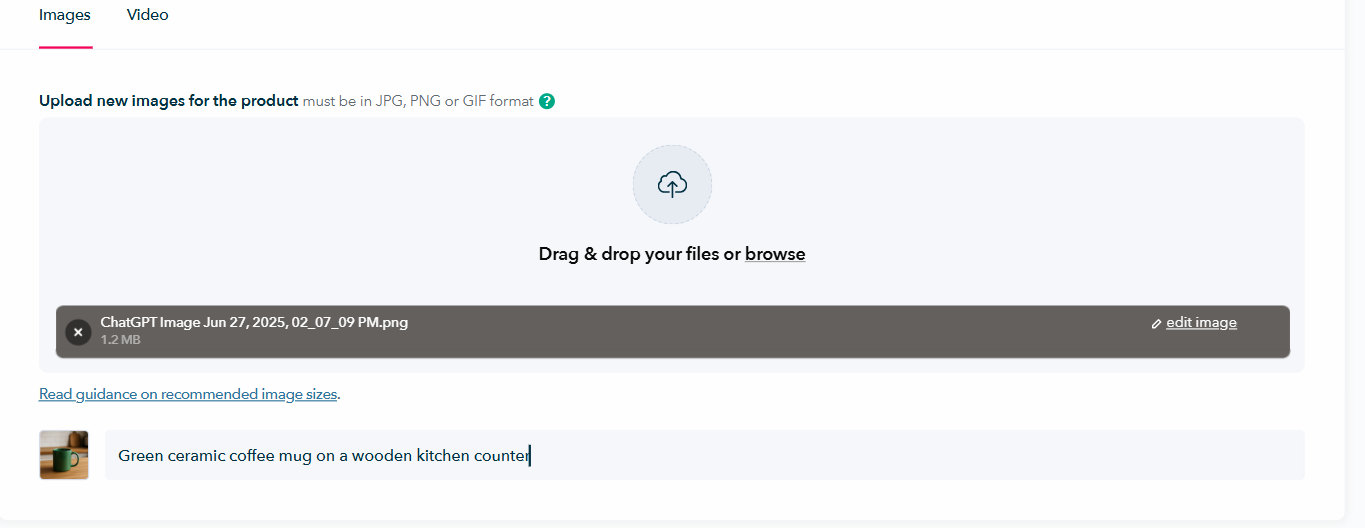
Adding image Alt text via Edit A Product page- ShopWired
Avoid keyword stuffing or vague phrases like “image123.jpg”. Alt text helps users and also contributes to SEO, making your images easier to find in Google search.
4. Be Mindful with Autoplay Banners
Homepage banners and carousels are a great way to showcase products, promotions and brand imagery — and ShopWired gives you the tools to make them dynamic and eye-catching.
However, for users relying on screen readers or keyboard navigation, autoplaying content can sometimes be harder to interact with. If accessibility is a priority for your store, and especially if you’re selling in highly regulated sectors, you may want to consider turning autoplay off or slowing it down.
Tip: If you use autoplay, try to keep the transitions slow, avoid flashing content, and make sure key messaging is also available elsewhere on the page so nothing gets missed.
Used well, banners are a valuable part of your site’s design. This is just something to be aware of if you want to go the extra mile for accessibility.
5. Use Proper Heading Structure
Headings aren’t just a way to style your text — they help organise your page for both users and screen readers. A clear heading structure makes your content easier to scan, understand, and navigate, especially for people using assistive technologies.
When editing text on your ShopWired store, use heading tags in the correct order:
- H1 for the main page title (this is usually set by your theme)
- H2 for major sections
- H3 for subsections under those
Avoid using bold text to imitate headings — it won’t be recognised as a proper structure by screen readers.
Tip: In the ShopWired editor, you can choose your heading level from the dropdown menu when formatting text.
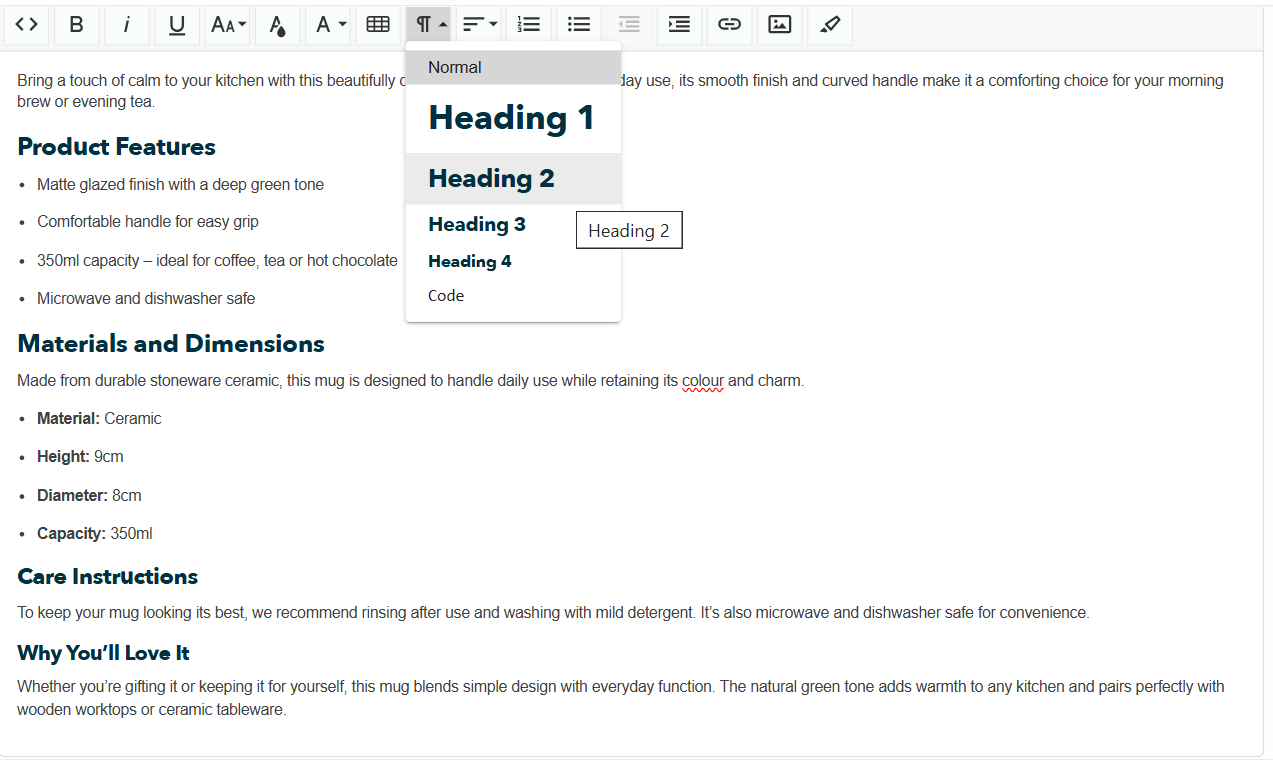
Adding H tags to your product description on ShopWired
Helpful Tools for Checking Accessibility
If you’re curious to see how your site performs from an accessibility point of view, there are a few free tools that can give you quick feedback. These aren’t required, but they can help you spot things like colour contrast issues, missing Alt text or heading order.
Here are a few you might find useful:
- WAVE Accessibility Tool: Paste in your website URL and get a visual report highlighting areas that may need attention.
- Google Lighthouse: Built into Chrome DevTools. Run an audit on your page to see scores for accessibility, performance, SEO and more.
- Contrast Ratio Checker: Quickly check if your text and background colours meet accessibility contrast levels.
These tools are especially handy if you’re making design updates or uploading new content and want to make sure everything is easy to read and navigate for all users.
Final Word
The European Accessibility Act is designed to make websites more usable for everyone — and the good news is that ShopWired already supports the technical requirements needed for compliance. If you’re selling to EU customers, there’s nothing you need to change to meet the new rules.
That said, a few of these steps — like adding alt text, checking your colour contrast or structuring your headings — are also part of meeting accessibility standards, and they’ll make your store more inclusive and enjoyable to browse.
We’ll continue to monitor any regulatory changes and keep you updated if anything further is required. In the meantime, if you have any questions about your store’s accessibility, feel free to reach out to our support team.
Read more about the European Accessibility Act (EAA) here.